
Bridge Takeoff Pro is the takeoff software our own estimators at Rocket Takeoffs use every day. Its AI draws real takeoff objects on your PDF plans across 33 trades, builds the material list and assembly breakdown, and leaves your estimator to check and approve the work instead of clicking for hours.
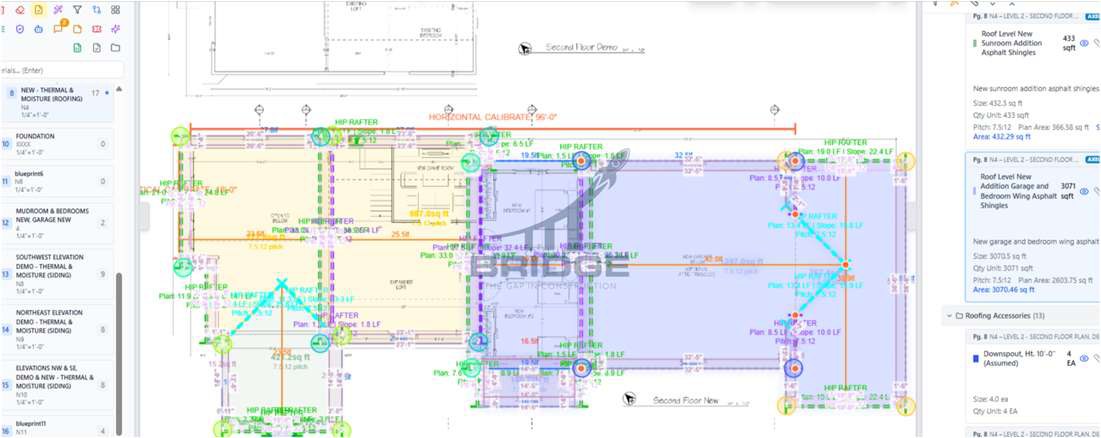
Rocket Takeoffs is an estimating company first. For years our estimators did takeoffs the same way everyone does: open the plan set, click every wall, every opening and every fixture, then rebuild the quantities in a spreadsheet. The software we used measured what we told it to measure. It never did the measuring for us.
So we built Bridge Takeoff Pro around the work we actually do. It has run our own production for two years. Every feature had to hold up on real bid sets, including plans with thin specs and missing details, before it was released to anyone else.
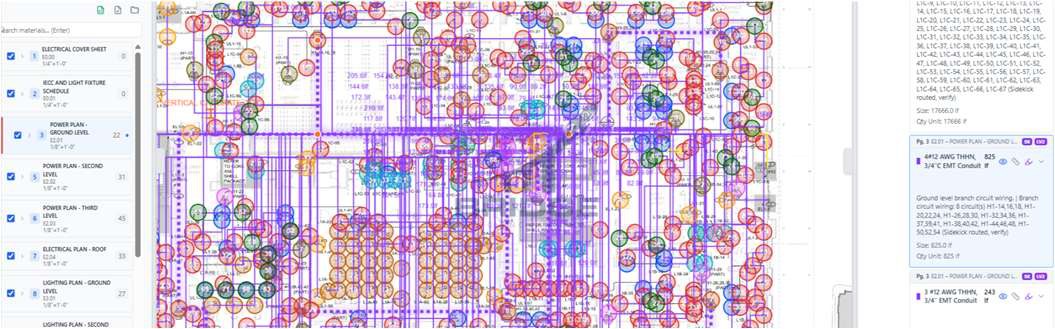
Same drawings, same scope. The difference is who does the repetitive work.
| Step | The old way | With Bridge Takeoff Pro |
|---|---|---|
| Measuring | Click every wall, opening and fixture by hand | AI draws takeoff objects directly on the sheet |
| Schedules and specs | Re-type them into spreadsheets | Auto counts, page naming and automations handle the repetitive clicks |
| Material list | Convert line items into pieces in a separate calculator | Assembly breakdown down to supplier-ready pieces and cut lists |
| Checking | Hope someone catches the missed scope before bid day | Built-in checks, then an estimator reviews and approves |
| Sharing | Email PDFs and Excel files back and forth | Shared projects, report links, PDF markups and Excel exports |
| Who can run it | Senior estimators only | A guided workflow lets juniors, grads and interns produce real work under your procedures |
| Result | Hours per page, bids you pass on, scope you miss | Minutes per page, more bids out, human-approved accuracy |
Typical internal results on our own projects. Your times depend on the plan set, the trade and how much scope is on each sheet.
Plenty of tools now say “AI.” This is what is actually different.
| Other takeoff software | Bridge Takeoff Pro | |
|---|---|---|
| What the AI does | Chat add-ons. Many connect to ChatGPT or Claude, but only give you PDF analysis and instructions. | Draws the takeoff for you. Our technology draws on the sheet and creates material cards instantly. |
| How automatic | Assisted AI. You still classify, select or point at things to make the automation work. | Fully automatic. Sidekick takes off the sheet on its own. Your estimator reviews and approves. |
| Trades | One or a few. Most automate one trade, or a handful at most. | 33 trades and counting across 11 CSI divisions, with more added as they pass our team’s testing. |
| When you get stuck | Software only. If you run out of time, you’re on your own. | Software plus takeoff service. Rocket Takeoffs can take over, finish or quality-check your takeoffs. |
| Development | Slow or stalled. Updates come slowly, or have stopped. | Upgraded every day, with NVIDIA Inception Program support. |
| Cost | Big contracts. Expensive annual commitments before you know if it fits. | Seats from $48 per month, pay-as-you-go AI Coins, no contracts, cancel anytime. |
| Support | Ticket queues. Slow help when something breaks. | Fast support from the team that builds it. |
If you are comparing takeoff software, these are the questions we would ask of any product, including ours.
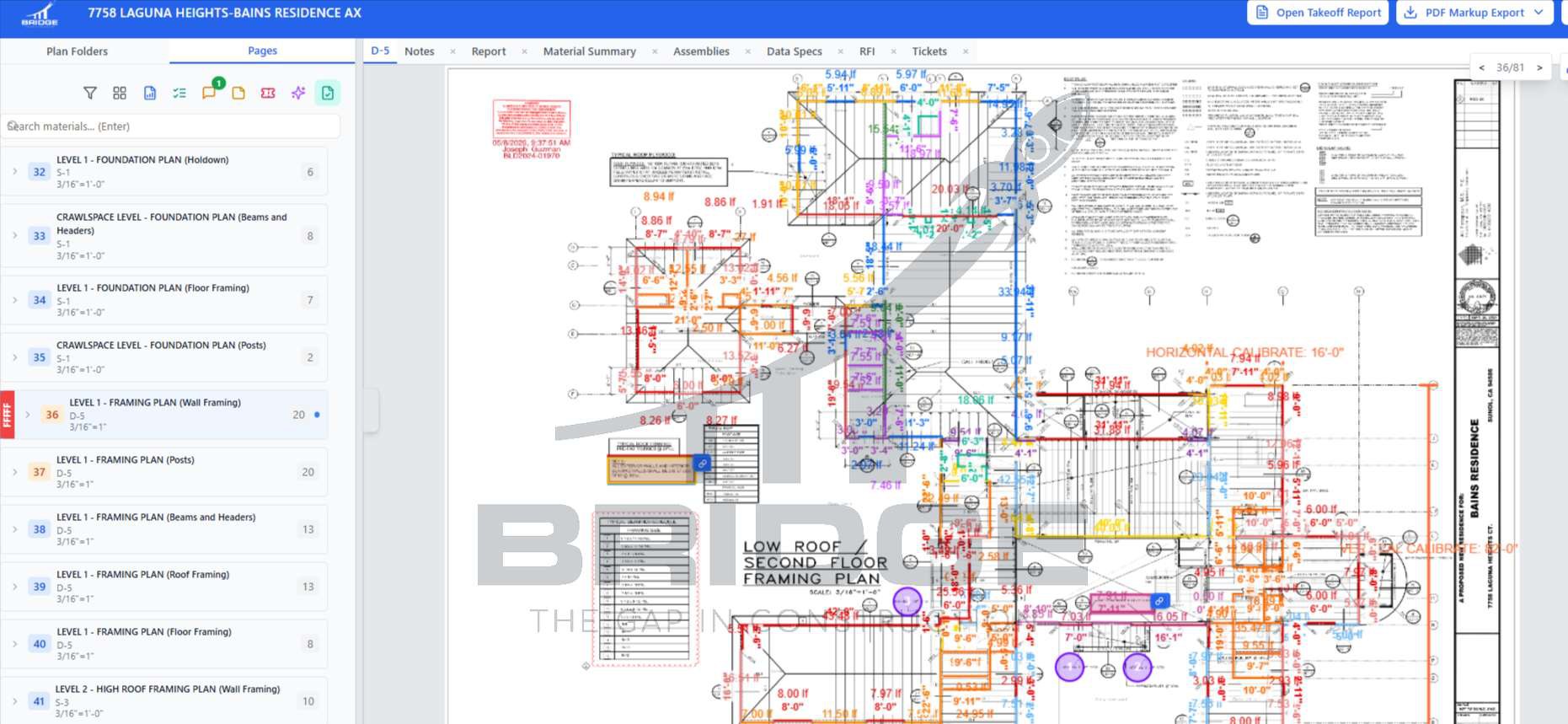
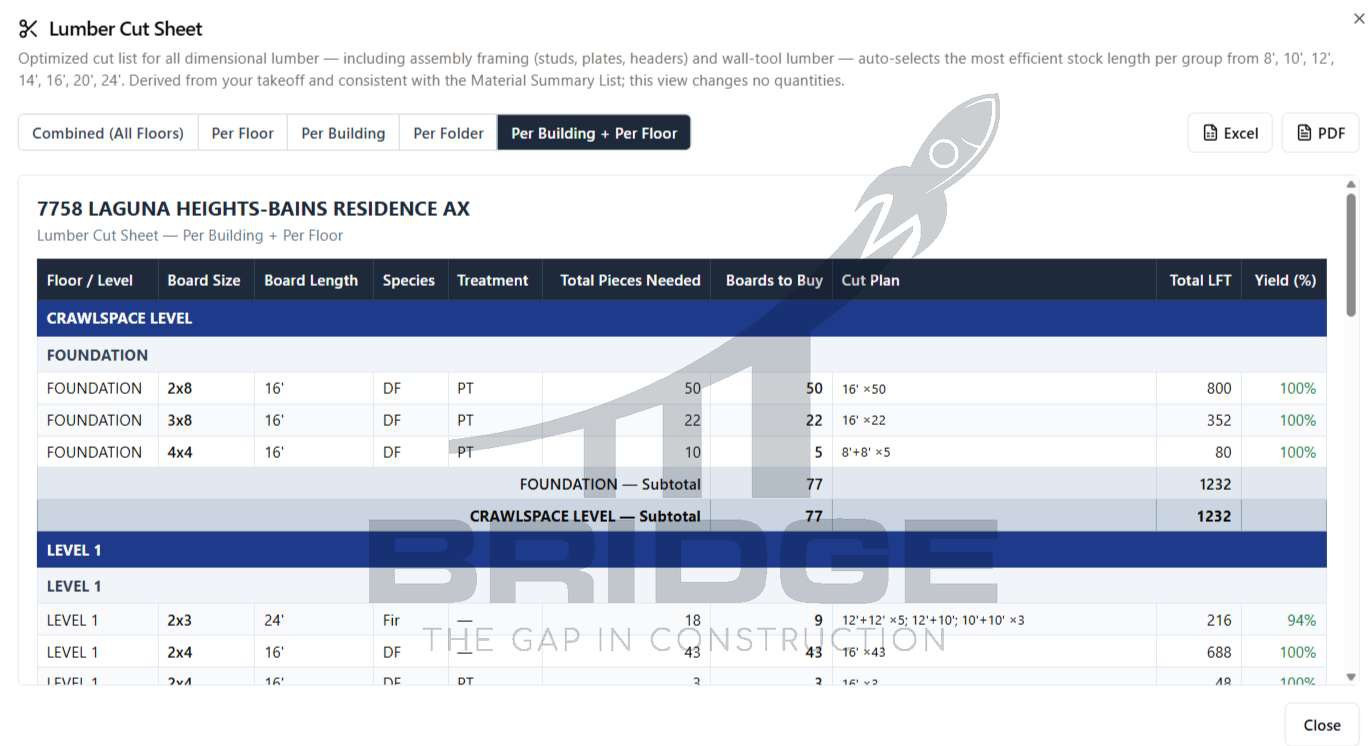
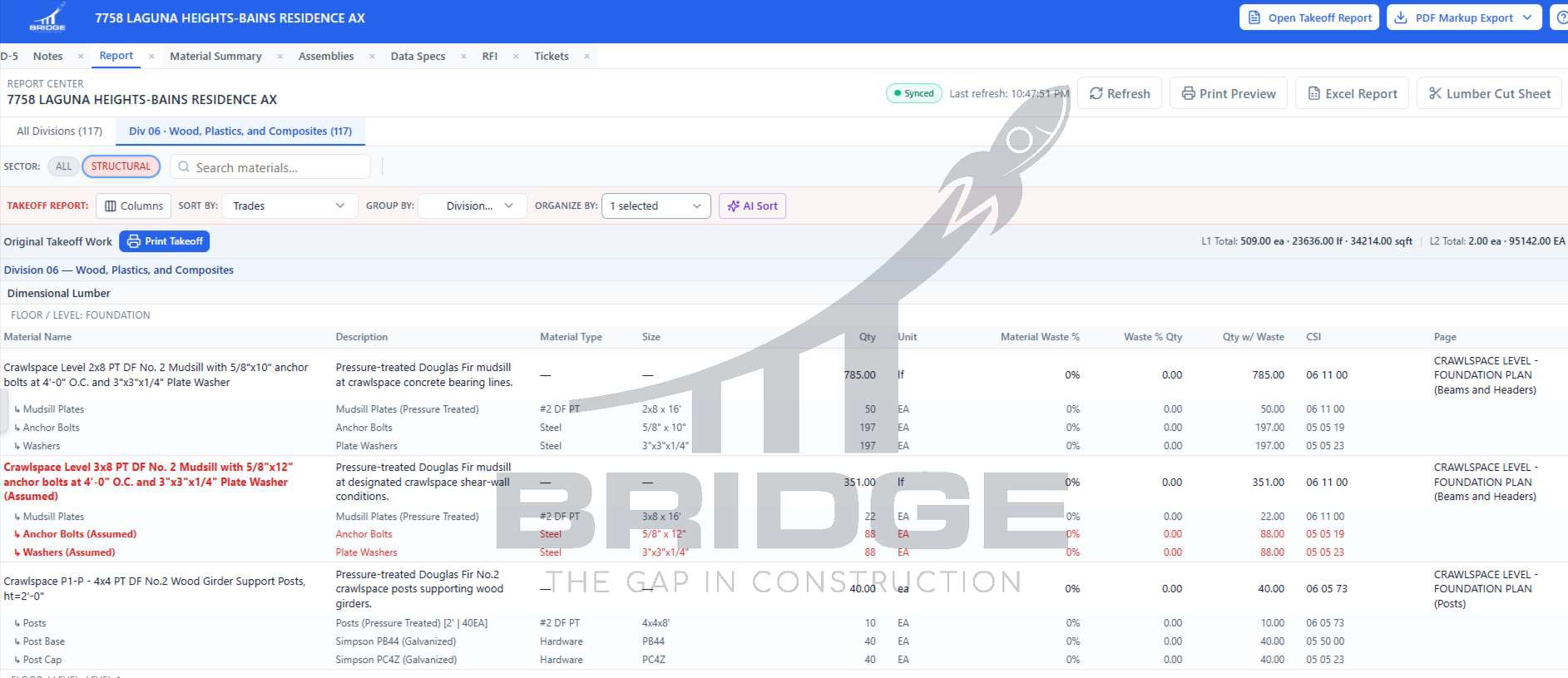
Most takeoff tools stop at the measurement. Bridge Takeoff Pro turns what you draw into an assembly breakdown, with about 100 assemblies across 10 CSI divisions. That is what lets a lumber yard quote straight from the counts, and a sub send a tighter bid with fewer change orders later.
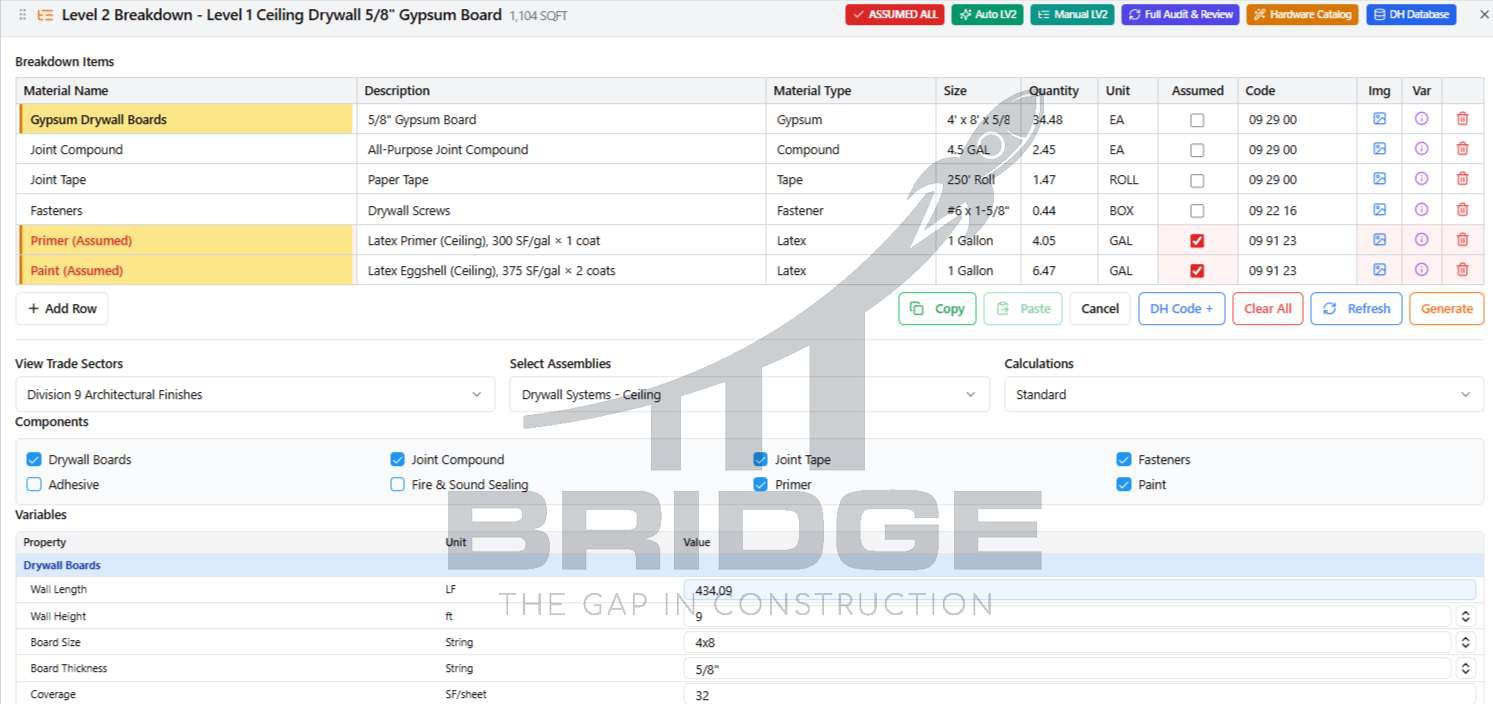
Drawn on the plan, then reviewed by an estimator. This is the list our own team runs every day.
Concrete and foundations, rebar on foundation plans, masonry, CMU and block, stucco
Steel framing, light-gauge metal framing, framing hardware
Lumber framing, sheathing, trusses, joists and EWP, decking, connectors and hardware
Roofing, soffits and fascia, thermal insulation, siding, flashing and sheet metal, doors and windows
Flooring, drywall, drywall light-gauge, paints and coatings, interior finishes, woodwork and trim, tile, ceilings and ACT, signage, countertops
Plumbing piping layout, plumbing fixture counts, electrical full wiring, electrical fixture counts
Trade coverage as of September 24, 2026. For any trade not on the list, Rocket Takeoffs can still do the takeoff for you with our estimators and QC.
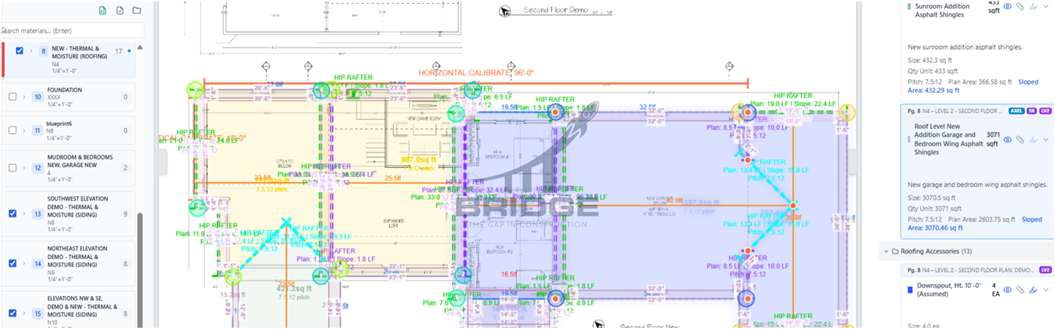
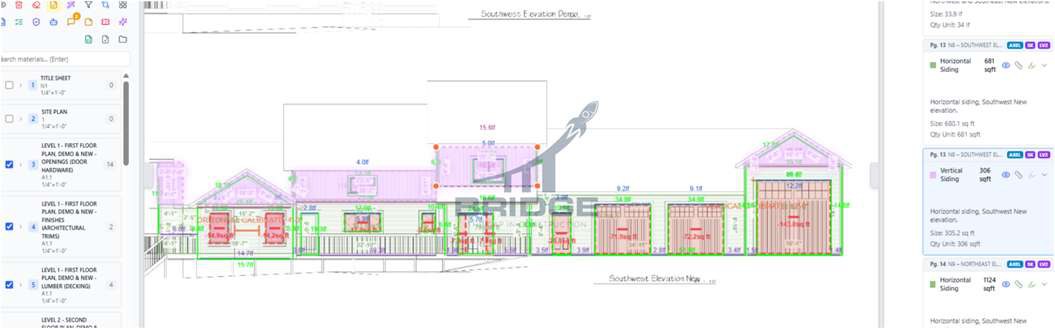
An uncut demo of a lumber floor framing takeoff done in about 3 minutes. Framing is just one example: Bridge Takeoff Pro runs automatic takeoffs across 33+ trades, including roofing, drywall, siding, doors and windows, concrete and more.
Start with a 7-day free trial. Seats start at $48 per month. Buy AI Coins only when you run AI auto takeoffs.
It’s not just a takeoff system. It’s a complete system. Every Bridge Takeoff Pro subscription also gives you access to BridgeWorks CRM, Project Manager and Field Management, all included.
Track every lead and client from the first call to the closed deal, with follow-ups built in.
Projects, tasks, stages, milestones and drag-and-drop Gantt schedules, all in one view.
Site reports with photos and video, daily logs, punch lists and safety reports from any phone or tablet.
📐 Pull your Bridge takeoff data straight into your projects, with no double entry.
Stop paying for separate CRM, project management and field apps.
Bridge Takeoff Pro does not replace our takeoff service. Use the software, send us the whole job, or anything in between.
Want to see the software work first? Watch uncut takeoffs on the Bridge Precon YouTube channel, or read our guide to construction takeoff software in 2026.
Yes. Every new account gets a 7-day free trial of Bridge Takeoff Pro with AI auto takeoffs included. There is no contract, and we set you up with a free onboarding call so you can run your first takeoff on your own plans.
Bridge Takeoff Pro is $48 per seat per month. Each seat gets you the full takeoff software plus 60+ modules to run your business:
AI auto takeoffs and the other AI features run on pay-as-you-go AI Coins. You buy coins only when you use AI, so there is no AI subscription and you only pay for the AI runs you need. Larger teams can get discounts. Book a call with us for details.
Both. Bridge Takeoff Pro is construction takeoff software your own team can run. If you would rather hand the work off, our estimators at Rocket Takeoffs do the takeoff for you as a construction takeoff and estimating service. Many customers use the software for everyday bids and send us the big or rushed projects. Get a free quote for takeoff services.
Yes, and here is why you can trust it. Bridge Takeoff Pro has been in development for 5 years. Before we released it to anyone, our own team of 40+ estimators used it on real bid sets for 2 years, and the bugs, problems and slow spots they found were fixed along the way.
No. Bridge Takeoff Pro is a construction-focused system trained and refined on our own takeoff data and workflows. It draws editable takeoff objects on the sheet and builds material cards. It is not a general chatbot placed on top of your plans, and it does not just describe the plan back to you.
No. Every seat also includes BridgeWorks CRM, Project Manager and Field Management. You can track leads and clients, run projects with tasks, milestones and Gantt schedules, and keep daily logs, site photos, punch lists and safety reports from a phone. Your takeoff quantities flow straight into your projects, so there is no double entry and no separate apps to pay for.
Yes. AI cost estimation is built in. It turns the quantities you draw into a priced estimate with AI-assisted material and labor costs, so you go from takeoff to estimate in the same system.
Yes. Lumber yards, building material suppliers and distributors use Bridge Takeoff Pro to quote straight from the plans. The AI draws the lumber takeoff, and the assembly breakdown turns walls, floors and roofs into supplier-ready piece counts and cut lists your counter staff can price. If your team is full, Rocket Takeoffs also provides lumber takeoff services for suppliers.
33 trades today, including lumber framing, sheathing, concrete and foundations, drywall, interior finishes, flooring, painting, roofing, siding, doors and windows, electrical and plumbing. We add new trades often. For any trade not on auto yet, you can use the full manual takeoff toolkit, or Rocket Takeoffs can do the takeoff for you as a service.
Look for takeoff software that draws real markings on your PDF that you can check and edit, not just a number in a box. It should cover the trades you bid, break assemblies down into the pieces you actually order, let your whole team work on the same project, and come from people who do takeoffs for a living. Try it on your own plans before you pay. That is why Bridge Takeoff Pro comes with a 7-day free trial.
No. It removes the clicking and counting. A qualified person still reviews and approves every takeoff before it goes into a bid. In our own team, that review step is what lets each estimator produce 3–5 times more work without cutting corners.
PDF and image plan sets for residential and commercial projects, including architectural, structural, foundation, elevation and electrical sheets.
Try Bridge Takeoff Pro free for 7 days, with AI auto takeoffs included. Seats from $48 per month after that. No contracts.
Looking for takeoff services instead? Click here for a free quote