

By the founders of Rocket Takeoffs and Bridge Apps · Updated October 2026 · 14-minute read
If you run a construction company or lead an estimating team, you already know the math. The jobs you win depend on the bids you send, and the bids you send depend on how many takeoffs your estimators can finish. When every wall, fixture and opening has to be clicked by hand, your bid volume hits a ceiling, no matter how good your people are.
That’s why so many general contractors, trade contractors and suppliers are shopping for construction takeoff software right now, and why “AI takeoff” has become one of the most searched terms in preconstruction. The problem is that most of what’s out there sounds the same. Every tool claims to be fast, accurate and powered by AI.
We’ve been on both sides of this. Our company, Rocket Takeoffs, has worked on more than 27,000 takeoff samples over seven years, and we built our own software, Bridge Takeoff Pro, because nothing on the market did what our own estimators needed. This guide answers the questions we hear most from owners and estimators who are deciding which takeoff software to bring into their company.
Key takeaways
- A good takeoff tool should draw the takeoff on your PDF, not just hand you a number or a material list you can’t check.
- AI takeoff software can now complete 70–90% of a takeoff in minutes. Your estimator reviews, adjusts and approves the rest.
- The biggest difference between tools is construction logic: whether the software understands how buildings go together when the plans and specs are incomplete.
- Check which trades are truly automated. Many tools automate only one trade or a handful.
- Look at the whole workflow: takeoff, material lists, reports, team collaboration, and what happens after the bid.
Why we built Bridge Takeoff Pro: a note from our founders
We didn’t set out to build software. We started Rocket Takeoffs as an estimating company, and for years our team did takeoffs the same way everyone else did: one wall, one fixture, one opening at a time. We watched talented estimators spend most of their day clicking instead of thinking, and we watched good contractors pass on jobs because nobody had time to take them off. The tools we tried either only handled one trade, or gave us an AI-generated list we couldn’t trust without redoing the work. So, as founders, we decided to build the tool we wished we had. We’ve spent the last five years building Bridge Takeoff Pro, turning everything our estimators know about how buildings go together into the software’s construction logic, and testing every feature on real bids before it reaches yours. Our own team has used it every day for the last two years, and we’ve spent more than 28,000 hours fixing bugs and refining it. Bridge Takeoff Pro isn’t a side project or a wrapper around someone else’s AI. It’s the system we run our own business on, and now we’re opening it up to yours.
What is construction takeoff software?
Construction takeoff software measures and counts everything on a set of plans so you know exactly what materials a project needs. It replaces the old process of printing drawings and measuring with a scale ruler and highlighters. You upload PDF plans, set the scale, and measure lengths, areas, volumes and counts on screen.
The output is a quantity takeoff: linear feet of wall, square feet of drywall, cubic yards of concrete, counts of doors, windows, fixtures and devices. Estimators use those quantities to build material lists, price the job and submit a bid.
Takeoff software has gone through three stages:
- Manual takeoff: paper plans, scale rulers and spreadsheets.
- Digital takeoff: on-screen measuring tools. Faster, but your estimator still clicks every line and every count.
- AI takeoff: the software reads the drawings and does the measuring and counting for you, and the estimator reviews the result.
Construction takeoff software vs. construction estimating software: what’s the difference?
People use the terms interchangeably, but they do different jobs. Takeoff software answers “how much do I need?” by producing quantities from the plans. Estimating software answers “what will it cost?” by applying material prices, labor rates, waste and markup to those quantities.
You’ll also see construction bidding software, which manages invitations to bid, subcontractor bids and bid-day paperwork. All three depend on the same thing: accurate quantities. Most construction estimating software still expects you to bring your own takeoff, or offers only basic manual measuring tools.
The takeoff is the foundation of the estimate. If the quantities are wrong, the price is wrong, no matter how good your pricing database is. That’s why most estimating time is actually spent on takeoff, and why speeding up takeoff has the biggest impact on how many bids you can send.
Can AI takeoff software really do a construction takeoff?
Yes, but there is a big difference between AI that talks about your plans and AI that actually does the takeoff.
A lot of takeoff tools on the market simply plug into a general AI chatbot like ChatGPT or Claude and connect it to your PDF. You can ask questions, get a summary of the plans, or receive an AI-generated material list. That can be useful, but underneath it’s still a wrapper: it gives you information about the plans, not an actual takeoff. You can’t see where the numbers came from. If a list says 412 studs, you have no way to check it against the drawing without doing the takeoff yourself.
A real takeoff is something your estimator can open, edit, adjust and reuse: on the next revision, the next bid, and the next job with the same plans. That’s what you need for reliable, accurate results you can bid with, and it’s what a chatbot answer can’t give you.
Other tools offer “assisted” automation. You still have to classify, select or point at items before the automation works, so your estimator is still doing a lot of clicking.
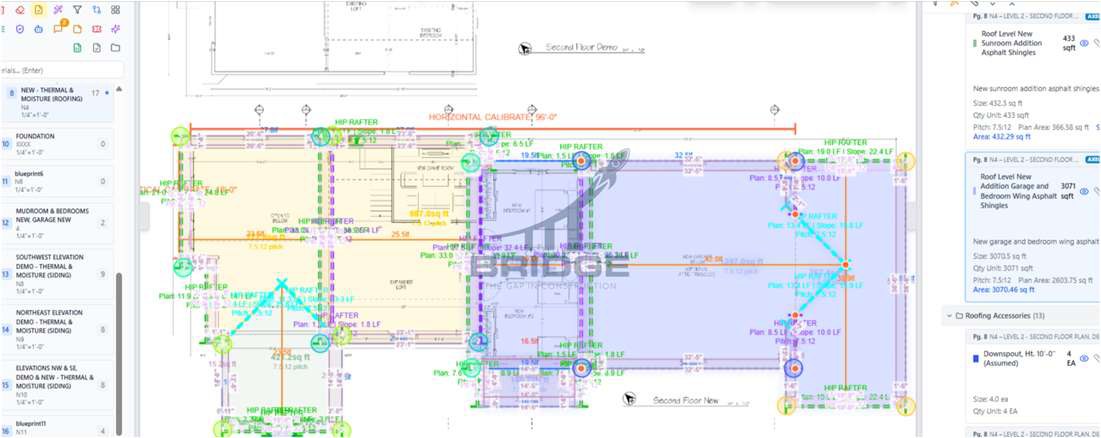
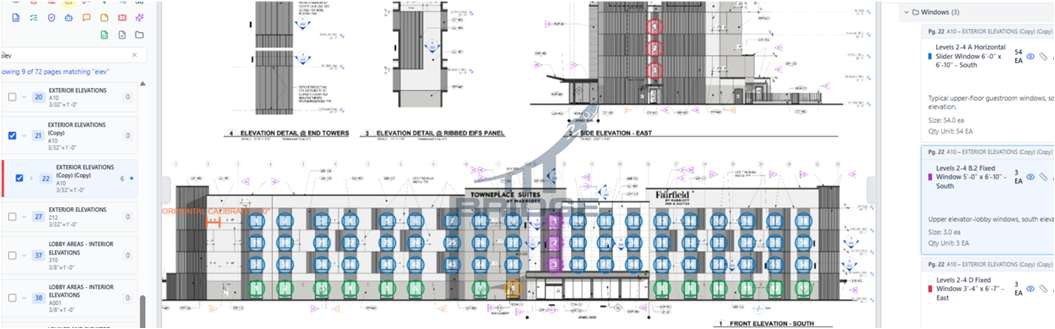
Bridge Takeoff Pro works differently. Our AI assistant, Sidekick, places real takeoff markings directly on your PDF: lines, areas and counts, color-coded by scope, on the actual sheet. Every quantity can be traced back to the exact spot on the plan it came from. Your estimator can review it, edit any line, and the material list updates instantly. Nothing has to be re-measured.
Why construction logic matters more than the AI model
Any software company can plug into a general-purpose AI model. What separates a real takeoff tool is the construction knowledge underneath it. Bridge Takeoff Pro is built on our own proprietary technology and algorithms with deep construction logic, developed from seven years of real takeoff work and our own construction databases.
It’s also not an app we threw together recently. Our Rocket Takeoffs team of estimators has been using Bridge Takeoff Pro on real projects every day for the last two years, and we’ve put in more than 28,000 hours of bug fixing, testing and improvements to make it the software it is today. Every feature has been pushed through real bids, real deadlines and real, messy plan sets before it ever reached a customer.
That logic is what lets Bridge Takeoff Pro handle real-world plan sets. Plans are rarely perfect. Sheets are missing, specs are thin, schedules conflict, and some residential sets have almost no specifications at all. In our experience, most AI tools struggle badly in that situation because they can only read what’s written. Bridge Takeoff Pro understands how buildings are assembled, so it can still produce a solid takeoff on plans with little to no specs. Your estimator then reviews it and confirms any assumptions before the bid goes out.
How much time does AI takeoff software actually save?
This is the question owners care about most, so here are real numbers from our own production use:
- Bridge Takeoff Pro typically completes 70–90% of the takeoff work in minutes. Your estimator spends their time reviewing and finishing instead of clicking.
- Simple pages often take 2–6 minutes, medium pages 10–15 minutes, and complex pages 30–60 minutes.
- One plumbing page that took an estimator about 10 hours by hand was completed in about 45 minutes.
For a company, that time adds up fast. When each estimator can take off three to five times more work, you can bid more jobs without hiring more people, respond to invitations to bid you used to pass on, and get proposals out before your competition.
Is AI takeoff accurate? Do you still need an estimator?
You still need an estimator, and you should be wary of any software that tells you otherwise.
Every AI system can make mistakes. Plans can have scale issues, unclear scope or conflicting details. The right approach is AI does the heavy lifting, and a qualified person verifies and signs off. Bridge Takeoff Pro has quality checks built into its AI, but the final review is always human. That’s the same process our own team of 40+ estimators follows every day.
The point of AI takeoff isn’t to replace your estimator’s judgment. It’s to give them their time back. The value is that your team no longer has to click every wall, draw every area, count every fixture by hand, or build the material list line by line. Bridge Takeoff Pro does that tedious work in minutes: the markings are drawn on the plan and the material list is created for you. Your estimator starts from a takeoff that’s already 70–90% done instead of a blank sheet. Even with a thorough review, that’s hours saved on every plan set, and it’s the difference between bidding a few jobs a week and bidding many.
What changes is how your estimator spends their time. Instead of drawing every line, they review a takeoff that’s already drawn, adjust what needs adjusting, and approve it. Because the markings sit right on the plan, that review is fast, and it’s also easier to catch mistakes than with a list of numbers.
There’s a second benefit owners like: a guided, review-based workflow lets junior estimators, recent graduates and interns produce accurate work under your company’s procedures, while senior estimators focus on review and bidding.
What trades can construction takeoff software handle?
Before you buy, check which trades are actually automated, not just “supported” with manual tools. Many AI takeoff products automate one trade or a few. Bridge Takeoff Pro’s AI takes off 33 trades across 11 CSI divisions today, and more are added as they pass our team’s testing.
Concrete and masonry (Divisions 03–04)
- Concrete and foundations
- Rebar (foundation plans)
- Masonry
- CMU and block
- Stucco
Metals and structural (Division 05)
- Steel framing
- Light-gauge metal framing
- Framing hardware
Lumber and framing (Division 06)
- Lumber framing
- Sheathing
- Trusses, joists and engineered wood products (EWP)
- Decking
- Connectors and hardware
Roofing and openings (Divisions 07–08)
- Roofing
- Soffits and fascia
- Thermal insulation
- Siding
- Flashing and sheet metal
- Doors and windows
Interiors and finishes (Divisions 09, 10 and 12)
- Flooring
- Drywall and gypsum
- Drywall light-gauge framing
- Paints and coatings
- Interior finishes
- Woodwork and trim
- Tile
- Ceilings and ACT
- Signage
- Countertops
Plumbing and electrical (Divisions 22 and 26)
- Plumbing piping layout
- Plumbing fixture counts
- Electrical full wiring
- Electrical fixture counts
Bridge Takeoff Pro works on architectural, structural, foundation, elevation and electrical sheets, on residential, multifamily, commercial and industrial projects. For trades that aren’t automated yet, you still get a full set of manual takeoff tools, and Rocket Takeoffs’ estimating team can do the takeoff for you as a service.
How to choose the best construction takeoff software: 10 questions to ask
Use this checklist when you compare options and run trials:
- Does the AI draw the takeoff on the plan? You should be able to see, click and edit every quantity. A material list with no markings can’t be checked quickly.
- Is it fully automatic, or assisted? If you still have to select or classify every item first, the time savings shrink.
- How many trades are truly automated? Ask for the exact list, then test it on your own plans.
- Does it handle incomplete plans? Upload a real set with thin specs, not a clean demo set, and see what happens.
- Does it go beyond square feet and linear feet? Suppliers and crews need pieces. Look for assembly breakdowns (studs, plates, sheets, fasteners), cut lists and supplier-ready material summaries.
- Can your whole team work in it at once? Look for real-time collaboration: multiple estimators in the same project, notes on the sheet, and audit logs.
- Are the reports usable by your customers and suppliers? Color-marked PDFs, Excel exports and summaries grouped by floor, building or division save hours after the takeoff.
- Is there real support and training? Onboarding calls, live training and fast answers matter more than a feature list.
- Is development active? AI tools improve quickly. Make sure the product you buy is being upgraded regularly, not standing still.
- Can you get help when you’re slammed? A software company that also has an estimating team behind it can step in when your bid board is full.
Takeoff and estimating software for general contractors, trade contractors and suppliers
General contractors need to take off many trades quickly to check subcontractor bids, catch scope gaps and budget early. Multi-trade automation and clear, color-coded markings make it easy to compare what each sub included.
Trade contractors (framing, drywall, concrete, roofing, electrical, plumbing and more) need depth in their own trade: accurate counts, waste, and piece-level detail they can order from. Assembly breakdowns and cut lists turn a takeoff into a material order.
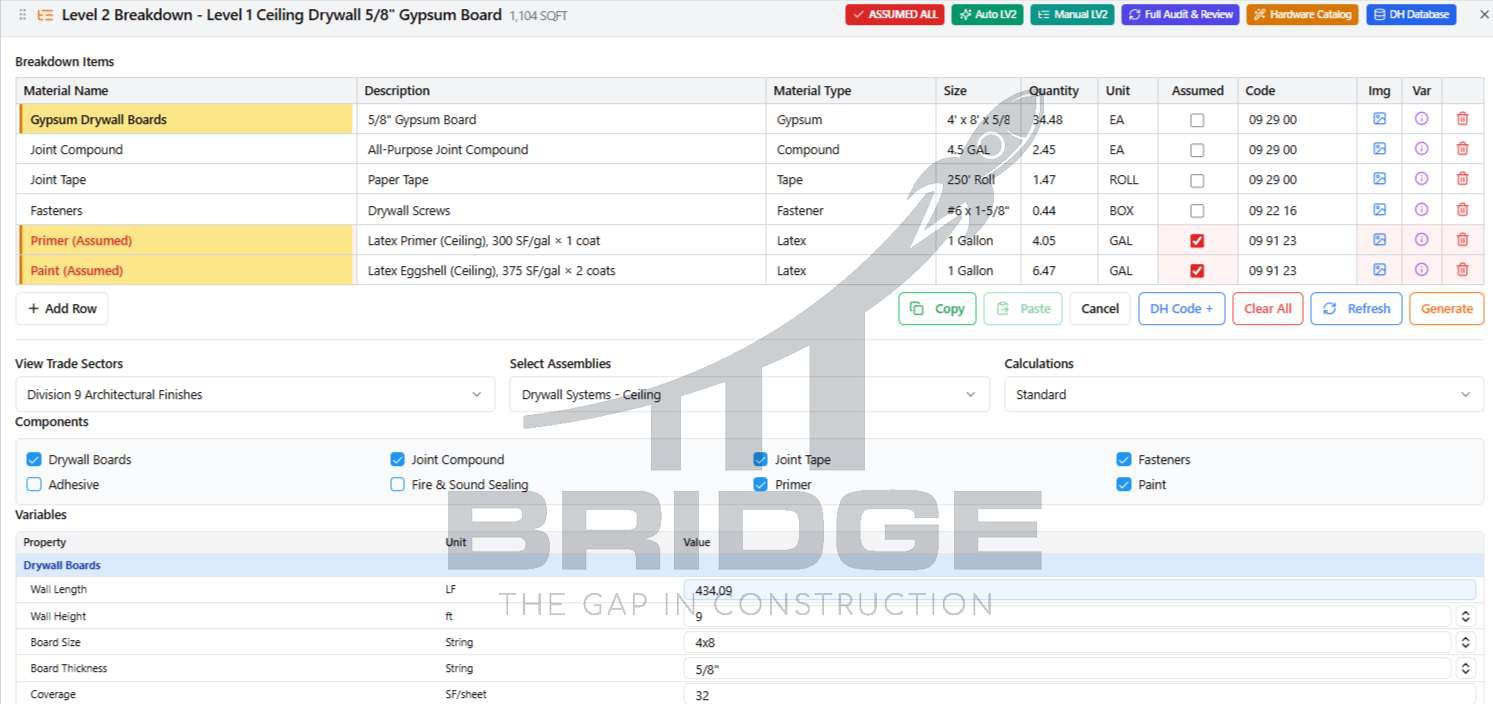
Suppliers, lumber yards and distributors need supplier-ready quantities, fast. Material summary lists sorted by floor or building make quoting much faster.
How much does construction takeoff software cost? (And is there a free option?)
Pricing varies widely, from monthly per-user subscriptions to large annual contracts with setup fees. When you compare, look at:
- whether you’re locked into an annual contract
- whether AI features cost extra, and how they’re billed
- whether training and support are included
- what other software you’ll still need to buy on top (CRM, project management, field reporting)
You’ll also find free construction takeoff software. Free tools can be fine for an occasional simple job, but they usually limit plan size, trades, exports or users, and none of them draw the takeoff for you. A better way to try professional software at no cost is a free trial on your own plans.
Bridge Takeoff Pro keeps it simple. Seat licenses start at $48 per seat, there are no long-term contracts, and you can cancel anytime. Seats include the full takeoff toolkit, auto counts and automations. AI auto takeoffs run on pay-as-you-go AI Coins, so you only pay for the AI work you actually use. Larger teams can ask about Enterprise pricing and team discounts.
It’s not just takeoff software: BridgeWorks construction CRM and project management software are included
Most companies end up paying for a takeoff tool, a CRM, a project management app and a field reporting app, and then copying data between all of them. Every Bridge Takeoff Pro subscription also includes access to BridgeWorks CRM, Project Manager and Field Management:
- CRM and sales pipeline: track every lead and client from the first call to the signed contract, with follow-ups built in.
- Project manager: projects, tasks, milestones and drag-and-drop schedules in one place.
- Field management: site reports with photos and video, daily logs, punch lists and safety reports from any phone or tablet.
Your Bridge Takeoff Pro data flows straight into your BridgeWorks projects with no double entry. It’s a complete system for running your business, not just a takeoff tool.
Software, service, or both?
Some companies want to run takeoffs in-house. Others are buried and need help this week. With Bridge Takeoff Pro you don’t have to choose. Rocket Takeoffs still offers takeoff services for every CSI trade. We can do the full takeoff, take over and finish one your team started, or quality-check your team’s work.
Watch a live demo: real takeoffs, no cuts
Don’t take our word for it. Watch Bridge Takeoff Pro work on real plan sets on our YouTube channel, Bridge Precon. The demos are recorded in real time with no video cuts or edits, so you see exactly how long a takeoff takes and how the markings and material list are created on an actual sample plan.
Watch live takeoff demos on YouTube →
How to get started
The best way to judge any takeoff software is to run your own plans through it. Bridge Takeoff Pro offers a 7-day free trial with AI auto takeoffs included. Sign up, and our team sets up your account and walks you through the app on a free onboarding call.
Upload a plan set you know well, ideally one with thin specs, and compare the result to how long it took your team by hand.
See Bridge Takeoff Pro draw your next takeoff
Real drawing markings on your PDF that you can review and edit, with an instant material list. 33 trades. BridgeWorks CRM, Project Manager and Field Management included. No contracts.
Frequently asked questions
What is the best construction takeoff software for contractors?
The best takeoff software for your company is the one that automates the trades you bid, shows its work on the plan so your estimators can verify it, handles real-world incomplete plans, and fits your budget without a long contract. Test any option on your own plans during a free trial before you commit.
Can AI do a takeoff from a PDF?
Yes. Modern AI takeoff software reads PDF plan sets and places measurements and counts directly on the drawings. With Bridge Takeoff Pro, the AI draws real takeoff markings on your PDF that you can review and edit, and it builds the material list automatically.
How accurate is AI takeoff software?
Accuracy depends on plan quality and on the construction logic behind the software. No AI is perfect, so every AI takeoff should be reviewed and approved by a qualified estimator. But accuracy is only half the story. The real value is time: your team no longer has to click, draw and count everything by hand or build the material list from scratch. Bridge Takeoff Pro does 70–90% of that work in minutes, and its built-in quality checks and traceable markings on the plan make the review fast.
Will AI takeoff software replace estimators?
No. It replaces the repetitive clicking, not the estimator. Bridge Takeoff Pro does 70–90% of the takeoff work in minutes, and your estimator reviews, adjusts and approves it. Estimators get more done and can focus on scope, pricing and winning bids.
Can takeoff software work on plans with missing specifications?
Many tools struggle when specs are thin or missing because they can only read what’s written. Bridge Takeoff Pro uses proprietary construction logic to complete takeoffs on plans with little to no specs. Your estimator then reviews the takeoff and confirms any assumptions before bidding.
How long does a takeoff take with AI?
In our production use, simple pages often take 2–6 minutes, medium pages 10–15 minutes and complex pages 30–60 minutes, including review. Manual takeoffs of the same pages can take hours.
Is Bridge Takeoff Pro a new app?
No. Bridge Takeoff Pro was built over five years, and our Rocket Takeoffs estimators have used it on real projects every day for the last two years. We’ve put more than 28,000 hours into bug fixing, testing and improvements. You can watch it work in real time, with no cuts, on our YouTube channel, Bridge Precon.
Is there free construction takeoff software?
There are free takeoff tools, but they are usually limited to basic manual measuring, a few pages or a single user, and they don’t draw the takeoff for you. Bridge Takeoff Pro offers a 7-day free trial with AI auto takeoffs included, so you can test real AI takeoffs on your own plans before paying anything.
Is there a free trial?
Yes. Bridge Takeoff Pro includes a 7-day free trial with AI auto takeoffs included, plus a free onboarding call.
Does Bridge Takeoff Pro include a CRM?
Yes. Every subscription includes access to BridgeWorks CRM, Project Manager and Field Management, so you can manage leads, projects and job sites in the same system as your takeoffs.
Bridge Takeoff Pro was built over five years by the founders of Rocket Takeoffs, an estimating company that has worked on more than 27,000 takeoff samples over seven years. Our 40+ estimators have used Bridge Takeoff Pro on real projects every day for the last two years. Bridge Apps is a member of the NVIDIA Inception Program.

